

For those of you that are experiencing the issue where EV Play will not switch to the EV Play screen after the vehicle wakes from sleep, we have developed a hardware fix to address this. Note that this is only for units shipped prior to approximately December 1st of this year, as this fix has been applied to all devices shipped after that date. Please do not attempt this fix if you are not somewhat technically inclined.
1) Remove power from the device and cut the tamper proof stickers down the middle.
2) Position the unit with the fan pointing down and unscrew the 4 case screws (one at each corner).
3) Flip the unit upside down so that the fan is pointing upwards and with the USB ports facing towards you, slowly peel the top half of the case back away from you like a clam. Be careful not to dislodge the small black antenna wire. It helps to lean the top half of the case up against something.
4) Inside you’ll find either a rainbow data cable, or a series of traditional cables.
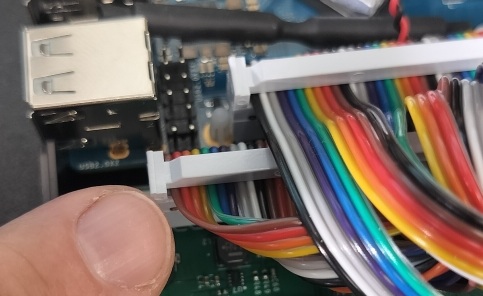
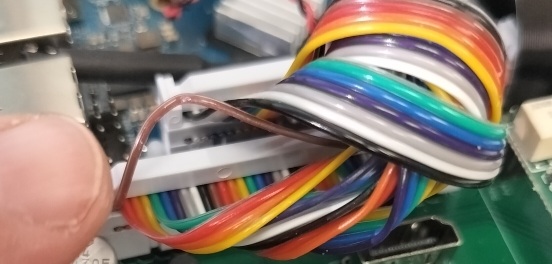
If the rainbow cable -> You want to separate the brown wire my finger is pointing to away from the other wires using a thumbnail or small flat-head screwdriver – don’t damage the red wire next to it – then cut that brown wire and tape both ends:
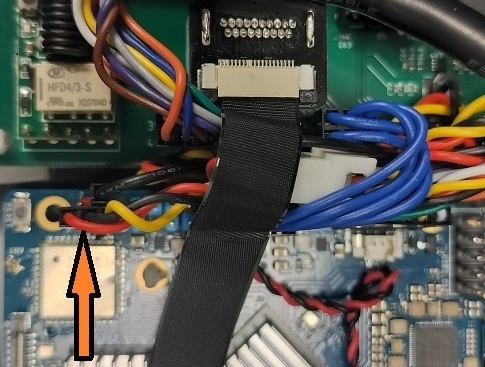
If a series of traditional cables-> You’ll want to cut the red wire that the orange arrow is pointing to, then tape both ends:
That’s it! Reverse the steps to close the case and re-install EV Play. Please reach out with any questions!